ply in Claude and ChatGPT
Get custom 3D-printed parts priced and ordered without leaving your chat: describe a part, upload a 3D file, or pick a ready-made model, and see it in 3D with a live price.
Add ply
- Claude: open Settings → Connectors, find ply 3D Printing and click Connect. On a Team or Enterprise plan, an Owner adds it for the organization first.
- ChatGPT: open Apps, find ply 3D Printing and connect it, or type @ply in a chat.
- Not in the directory where you are yet? Add it as a custom connector with this address:
https://www.plyparts.com/mcp. No account or sign-in is needed.
Things to ask
Ask in your own words. Here's how it looks in a chat:
You: Get a price from ply on a 3 mm thick, 40 × 30 mm plate with an M3 hole in each corner, in blue PETG.
Assistant with ply: Here's your plate: 40 × 30 × 3 mm with a hole near each corner, in blue PETG. You can turn it in 3D, change the material, color or quantity, and press Order on ply when you're ready.
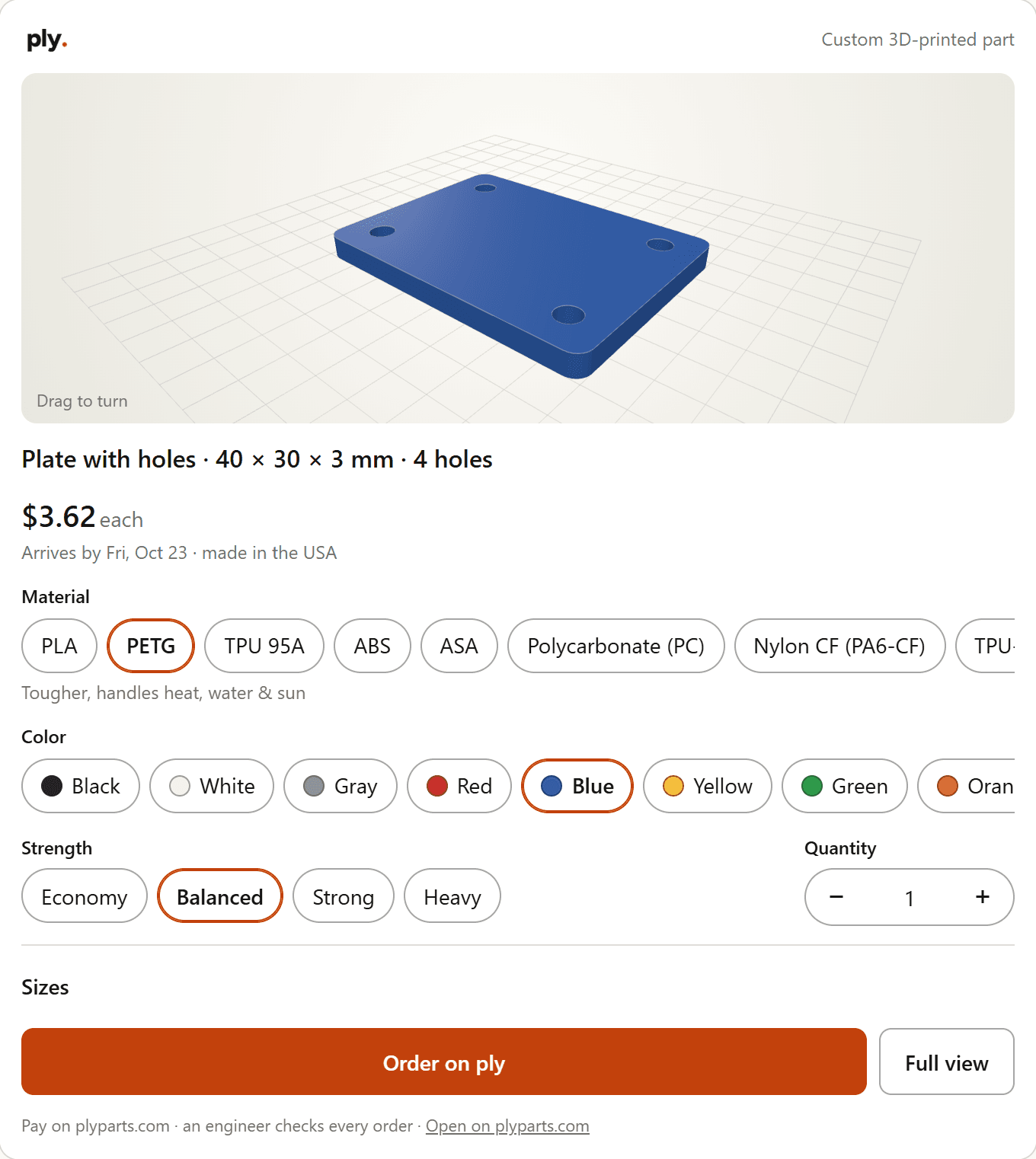
More things to ask:
- “Price this STL with ply in black PETG.” (with your file attached, or dropped into the ply card)
- “Find me an under-desk headphone hook and get a price from ply.”
- “Find a barrel model I can print about 100 mm tall and price it with ply.”
- “Get this MakerWorld model printed with ply: …” (paste the model's link)
- “Which material should I use for a bracket in my hot garage? Ask ply.”
Models from online libraries: ply can pull ready-made models straight from some online libraries (Printables and Poly Haven today), but only when the model's license allows us to print it for sale. The creator is always credited, in the chat and on your order. ply can't reach every model site: for others, such as Thingiverse and MakerWorld, you'll download the file yourself and drop it into the ply card (the card links you to the model's page).
Where to find models
Looking for a ready-made model? These sites are good places to start: download the file, then drop it on the ply home page for an instant price. If you use ply in Claude or ChatGPT, it can also search some of them for you. Before ordering, check that the model's license allows having it printed by a service (for example CC0, CC BY, CC BY-SA or a commercial-use license); personal-use-only models can't be printed for you.
ply isn't affiliated with or endorsed by these sites. Names are used only to point you to them; each belongs to its owner.
What the ply card does
- Shows your part in 3D. Drag to turn it.
- Lets you pick plastic or resin, material, color, strength and quantity, with the price and arrival date updating as you go.
- For parts made from sizes, “Full view” lets you change the sizes too. ply checks every part can be printed and explains any problem.
- Has an “Upload a 3D file” box for STL, 3MF, STEP and OBJ files. In ChatGPT you can also attach the file to your message.
- Not sure which material? Ask: ply's own advisor recommends one, and may ask a question or two first.
Ordering
Press Order on ply. Your part goes into a cart on plyparts.com, where you choose shipping and pay by card, Apple Pay or Google Pay. Nothing is ever charged inside the chat. Your card is only authorized at checkout: an engineer checks every order before it prints, and we charge it then. We don't print weapons or weapon components.
Privacy
Your assistant sends ply only what's needed to make your part: sizes, choices, model links and the files you give it, never your conversation, name or email. See our privacy policy and terms.
Help
Questions or problems? Email orders@plyparts.com.